Why Squarespace sites can look alike
A template decides the shape of a site before you have said anything about the business: how many sections the home page has, where the gallery sits, what the first button says. Squarespace's templates are well designed, and its AI builder now drafts a starting site from a description. Either way, finishing it is your job, in its editor or by asking its AI assistant. Change the shape and you are designing; keep it and your site shares it with everyone else who started from the same one.
Ember starts from designs too, and it has 114 of them. The difference is who does the finishing. Ember chooses a design for your trade, then builds the pages around what you actually sell and how customers reach you, and writes the words. You read it and ask for changes.
A potter's sentence, and the site Ember built from it
This is the whole first request for a demonstration site for a fictional pottery studio in Asheville:
“I'm a potter in Asheville. I sell stoneware, teach wheel classes and take commissions — help people book a class.”
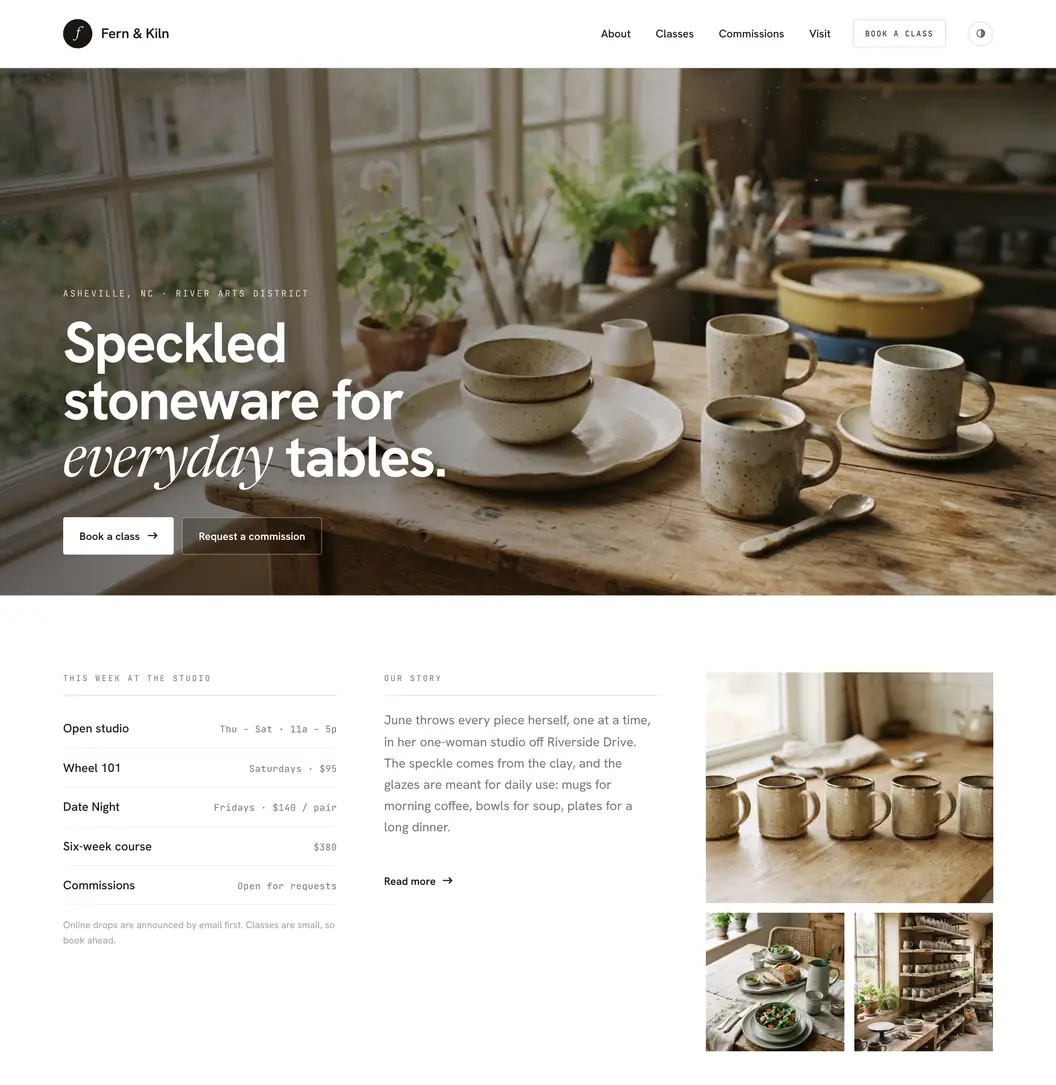
Ember laid the page out around the three things in the sentence: the stoneware leads, the class schedule and prices sit right under it, and the two buttons are booking a class and requesting a commission. Ember has no booking calendar or checkout, so a real studio would point “Book a class” at the booking tool it already uses, or take class requests through an Ember form.
Ember and Squarespace side by side
| Ember | Squarespace | |
|---|---|---|
| Built for | Owners who want a finished site without the design and writing work | People who want a polished template and the tools to shape it themselves |
| How a site starts | A sentence about the business, or an import of your Google listing, Instagram or current website | A template, or a starting site from Squarespace's AI builder |
| Decisions before launch | Ember chooses the design, layout and copy; you review and adjust | You refine the layout, images and copy, in the editor or with its AI assistant |
| Changing it later | Say what you want changed, in Ember or from Claude or ChatGPT | Edit it yourself, or ask Squarespace's AI assistant |
| Ready for customers | Mobile layouts and the SEO basics included; a contact form with an inbox and email alerts on Professional | Forms, selling, scheduling and memberships, depending on your plan and setup |
| Selling and bookings | Not supported; link to the tools you already use | Selling on every paid plan, with a 2% store transaction fee on Basic |
| People who can edit | 1 user on every plan | Up to 2 contributors on Basic, unlimited from Core |
| Cheapest plan on your own domain | $9 a month (Personal) | $19 a month billed yearly, or $25 monthly (Basic) |
| Free plan | Build and preview free; publishing needs a paid plan | No free plan; a 14-day free trial |
Source: Squarespace details are from Squarespace's pricing page and its AI website builder page, checked October 25, 2026 from the US; Ember's are from Ember's pricing.
When Squarespace is the better fit
- You sell online. If the potter wants to sell her mugs from the site, Squarespace can on every paid plan (2% store fee on Basic, none from Core); Ember can't sell at all.
- You take bookings or payments for classes and appointments. Squarespace has its own scheduling product; an Ember site can only link out to one.
- You enjoy designing, and want to drag, resize and rearrange every block yourself, or add your own code: every plan has a CSS editor, and Core and up add code injection and JavaScript.
- More than one person edits the site. Squarespace Basic allows 2 contributors and Core unlimited; every Ember plan has one user.
- You expect to make lots of small edits yourself. In Squarespace's editor your own time is the cost; every change Ember's agent makes spends credits from your monthly allotment (500 a month on Personal).
When Ember is the better fit
- You would rather describe the business than design the site. Ember picks the design and builds the pages around what you offer.
- You don't want to write it either. Ember drafts the copy from what you tell it and what it finds on Instagram, Google or your old site.
- Keeping it current shouldn't mean opening an editor. A new class, new prices or a new photo is one request, in Ember or from Claude or ChatGPT.
- You want enquiries to arrive somewhere from the start: on Professional ($29 a month), a contact form with an inbox and email alerts.
- You want the lowest price to be live on your own domain: $9 a month on Personal, against $19 a month billed yearly for Squarespace Basic, or $25 paid monthly.
What the first year costs
| Plan | Price | What it adds |
|---|---|---|
| Squarespace Basic | $19/mo billed yearly ($228), or $25 monthly | Your own domain, free for the first year on a yearly plan; 2% store fee; up to 2 contributors |
| Squarespace Core | $29/mo billed yearly ($348), or $39 monthly | No store fee, code injection and JavaScript, unlimited contributors |
| Ember Personal | $9/mo ($108 over 12 months) | Your own domain, one site, 500 credits a month; shows a “Made with Ember” badge |
| Ember Professional | $29/mo ($348 over 12 months) | Forms with email notifications, site analytics, 1,500 credits a month |
| Ember Premier | $49/mo ($588 over 12 months) | No “Made with Ember” badge, password-protected pages, member-only areas |
Source: Squarespace prices are before tax as listed on Squarespace's pricing page on October 25, 2026, viewed from the US; card processing fees are extra. Ember prices are before tax from Ember's pricing; every Ember plan also includes a free embersites.net address, and a domain bought through Ember costs extra.
Other Squarespace alternatives, by what you need
- Selling is the main job: a commerce platform such as Shopify, which is built around the store.
- You want more templates and more control over where every element sits: Wix (Ember as a Wix alternative compares the two).
- You want control over code, hosting and plugins: WordPress, at the cost of looking after it yourself (Ember vs WordPress).
- You want a quick interactive page or small app inside your AI assistant: ChatGPT Sites.
How to move from Squarespace to Ember
- Open the website import starter and paste your Squarespace site's address.
- Create a free Ember account. Ember reads your public pages and rebuilds them in an Ember design: the same pages and navigation, your text, logo, colors, photos and contact forms. It does not copy the Squarespace template.
- Read what Ember tells you it could not bring over. A store, scheduling, payments or member accounts stay behind, and Ember says so rather than faking them.
- Ask for any changes in plain words, then publish on a paid plan.
- Connect your domain in Ember's site settings, which list the DNS records to set wherever the domain is registered. Keep your Squarespace plan until the Ember site is live on it.
You don't need Squarespace's export for this. That export is a WordPress-format file that leaves out store, portfolio and several other page types, style settings and custom CSS (Squarespace Help Center, checked October 25, 2026). Ember works from the published site instead.