One page, or a site with pages
Carrd builds one page. You start from “one of dozens of templates (or a blank page)” and arrange its elements yourself (carrd.com, checked October 30, 2026). To look like more than one page, a Carrd site is divided into sections that visitors switch between, and an address such as /about can point at a section only through redirects, which need Pro Plus (Carrd redirects).
For a profile or a launch page, that is all you need, and Carrd does it cheaply. It gets tight when the site has to hold several things a visitor looks for separately: each book in a series, each service, an about page, a contact page. Ember builds those as separate pages, each with its own address, menu entry and title.
A mystery writer's sentence, and the site Ember built from it
This is the whole first request for a demonstration site for a fictional mystery writer:
“I write mystery novels. My new book comes out in March. Help readers find it and let book clubs invite me.”
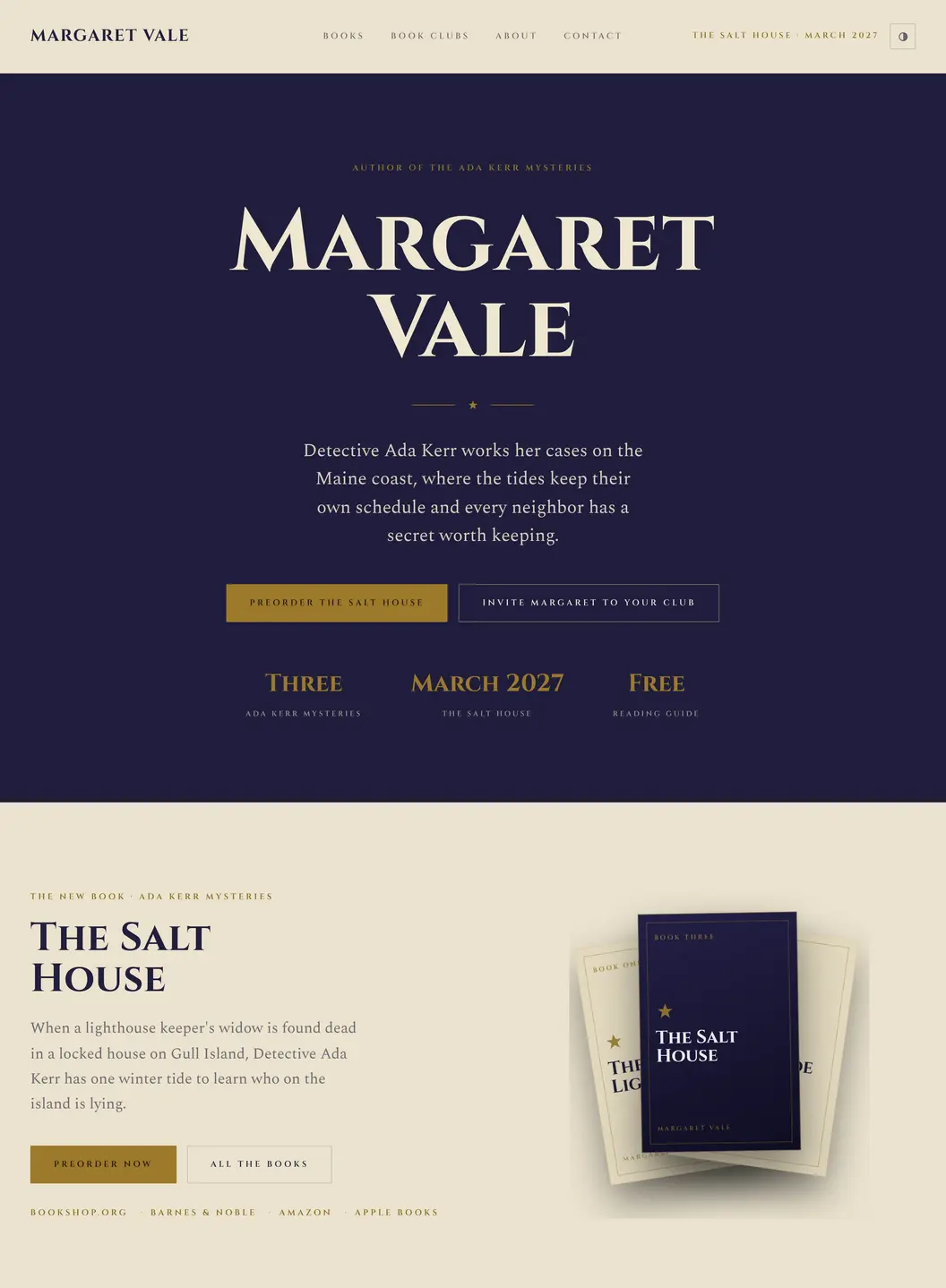
The menu holds Books, Book clubs, About and Contact, and the home page leads with the two things the sentence asked for: preordering the new book, and inviting the author to a book club. Under the new book sit links to four bookshops.
Room for the whole series
Further down the same page, the series is listed in reading order, with the new book marked:
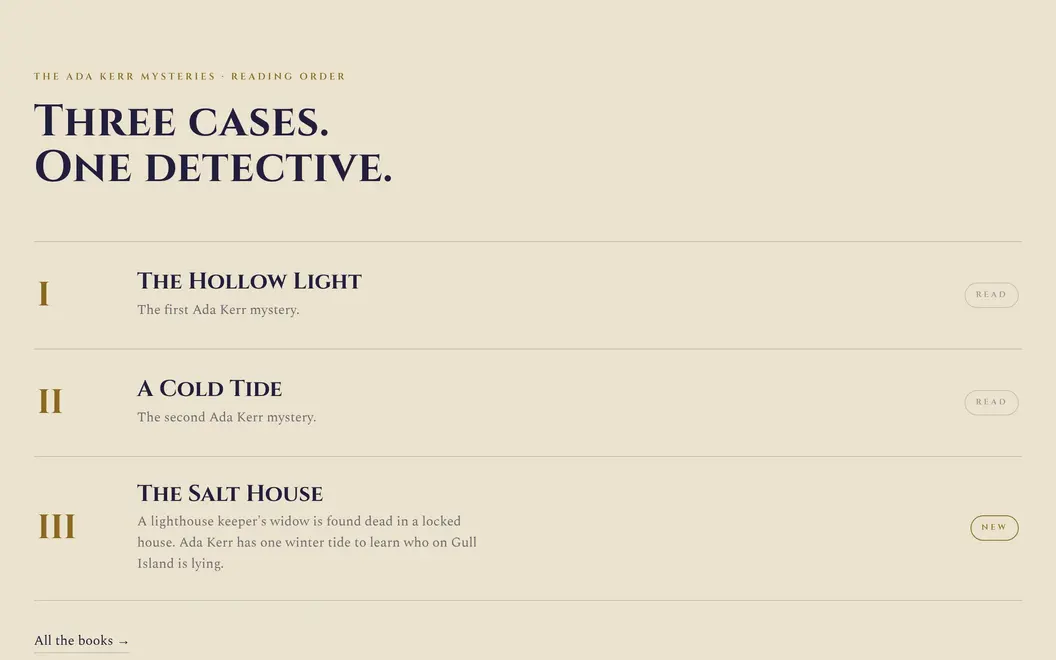
“All the books” leads to a page of its own, and Ember's Saga design gives every book its own page too. When the fourth book comes out, adding it is one request, such as “add The Night Ferry as book four, out next autumn”.
On a one-page builder, the same series is three more blocks on one long page, laid out by hand, or a section per book that visitors switch between.
Ember and Carrd side by side
| Ember | Carrd | |
|---|---|---|
| Built for | Owners who want a site with several pages finished and kept current for them | Anyone who wants one page, such as a profile, a landing page or a page of links, and likes arranging it |
| How a site starts | A sentence about you, or an import of your Google listing, Instagram or current website | One of dozens of templates, or a blank page |
| Pages | Separate pages, each at its own address | One page; sections simulate more, and addresses like /about need redirects on Pro Plus |
| Changing it later | Say what you want changed, in Ember or from Claude or ChatGPT | Edit the elements yourself in Carrd's builder |
| Ready for customers | Mobile layouts and the SEO basics included; a contact form with an inbox and email alerts on Professional | Responsive pages; forms from Pro Standard, with contact messages sent to your email |
| Payments | Not supported; link to a checkout you already use | Stripe payments on forms, on Pro Plus ($49 a year) |
| Sites per plan | 1 published site | 10 on Pro Standard, and up to 1,000 on larger plans |
| Without the builder's branding | Premier, $49 a month | Every Pro plan |
| Cheapest plan on your own domain | $9 a month (Personal); buy a domain in Ember or connect your own | $19 a year (Pro Standard); the domain is registered elsewhere |
| Free plan | Build and preview free; publishing needs a paid plan | Up to three sites, free, on .carrd.co addresses |
Source: Carrd details are from Carrd's Pro page, carrd.com and its docs on sections, contact forms, payments and custom domains, checked October 30, 2026 from the US; Ember's are from Ember's pricing.
When Carrd is the better fit
- One page is the whole job: a personal profile, a page of links, a sign-up page for a launch. Carrd was made for exactly that.
- Price matters most. Carrd Pro Standard is $19 a year with your own domain and forms; Ember's cheapest plan is $9 a month, $108 over a year.
- You run several small sites. Pro Standard covers 10 sites; each Ember plan publishes one.
- You take payments on the page. Carrd's Pro Plus adds Stripe payments to forms for $49 a year; Ember has no payments.
- You want no builder branding on a small budget. Every Carrd Pro plan removes it; Ember removes its “Made with Ember” badge only on Premier, at $49 a month.
- You enjoy placing every element yourself. Carrd's builder gives you that control; Ember works from what you ask for.
When Ember is the better fit
- The site needs real pages: books, services, an about page, a contact page, each one somewhere a visitor or a search engine can land directly.
- You would rather describe the site than build it. Ember chooses the design, lays out the pages and writes the copy from your sentence, like the mystery writer's preorder buttons and book club form.
- Your details already live somewhere. Ember starts from your Google listing, Instagram or current website instead of a blank template.
- The site will keep growing. A new book, service or price is one request, in Ember or from Claude or ChatGPT, rather than another block to arrange.
What the first year costs
| Plan | Price for a year | What it adds |
|---|---|---|
| Carrd Pro Lite | $9 | 3 sites without Carrd branding; no custom domain or forms |
| Carrd Pro Standard | $19 | 10 sites, your own domain, forms, widgets and analytics |
| Carrd Pro Plus | $49 | 25 sites, Stripe payments on forms, redirects, password protection |
| Ember Personal | $108 ($9/mo) | Your own domain, one published site, 500 credits a month; shows a “Made with Ember” badge |
| Ember Professional | $348 ($29/mo) | Forms with email notifications, site analytics, 1,500 credits a month |
| Ember Premier | $588 ($49/mo) | No “Made with Ember” badge, password-protected pages, member-only areas |
Carrd costs less at every level. What the difference pays for is the work: on Carrd you build and update the page yourself, and on Ember you describe the site and ask for changes, and Ember does them.
Source: Carrd prices are yearly, as listed on Carrd's Pro page on October 30, 2026, viewed from the US. Ember prices are monthly and before tax, from Ember's pricing, shown here over 12 months; every Ember plan also includes a free embersites.net address, and a domain bought through Ember costs extra.
Other Carrd alternatives, by what you need
- You only need somewhere to send followers from your bio, with a little more than buttons: a small site with a links page (replacing a link-in-bio page with a website).
- You want a polished template and an editor to finish every page in: Squarespace (Ember as a Squarespace alternative).
- You want to design every page yourself, with a store or bookings on the same site: Wix (Ember as a Wix alternative compares the two).
- You want the website bundled with a CRM, online bookings and review requests: Durable (Ember as a Durable alternative).
How to move from Carrd to Ember
- Open the website import starter and paste your Carrd site's address.
- Create a free Ember account. Ember reads your public page and rebuilds it in an Ember design: your text, logo, colors, photos and contact forms.
- Ask for the pages your sections were standing in for, such as “give each book its own page” or “move the about section to an About page”.
- Publish on a paid plan.
- Connect your domain in Ember's site settings, which list the DNS records to set at the provider where you registered it. Keep your Carrd plan until the Ember site is live on the domain.